

Description
Do you constantly get great ideas—only to lose track of them before you can act? Are scattered notes and manual typing slowing you down, causing lost opportunities and wasted time? For freelancers, agencies, creators, and SaaS teams, the biggest innovation bottleneck isn’t creativity—it’s the friction of capturing and organizing ideas when inspiration strikes. The Voice to Notion AI Automation System is built precisely for this pain. Imagine a ready-to-use automation toolkit that transforms your voice notes into actionable, organized Notion entries with the intelligence of AI—no more manual input, no more lost insights, and no more missed deadlines. Unlock a seamless workflow that keeps your best thinking where it belongs: in action.
What Does This Product Include?
The Voice to Notion AI Automation System is a comprehensive automation stack designed for effortless idea capture, processing, and organization. Here’s what you get:
- 1-Tap Voice Capture Shortcuts for iPhone/Mac: Rapidly send dictations from your phone or computer straight to your Notion database using smart Shortcuts and Make.com. No technical setup or coding required.
- AI-Powered Organization: ChatGPT and OpenAI models convert your raw audio into structured idea logs, summaries, content ideas, todos, and more.
- Prebuilt Notion Workspaces: Carefully designed Notion databases and dashboards sorted by category—ideas, journals, brainstorms, task lists—with tags and filtering for rapid access.
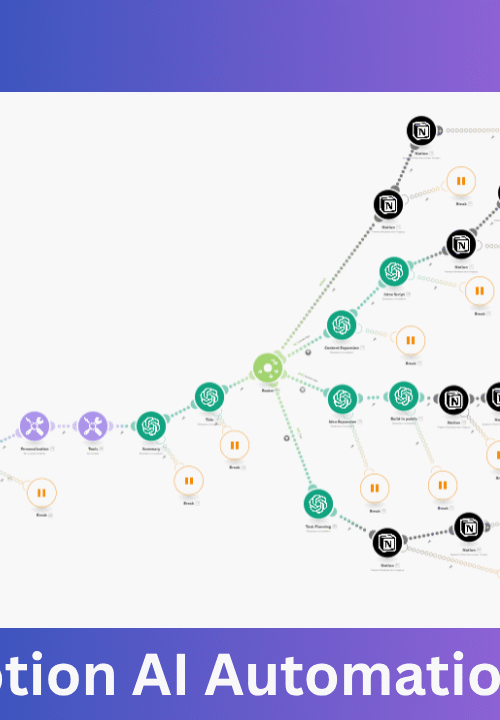
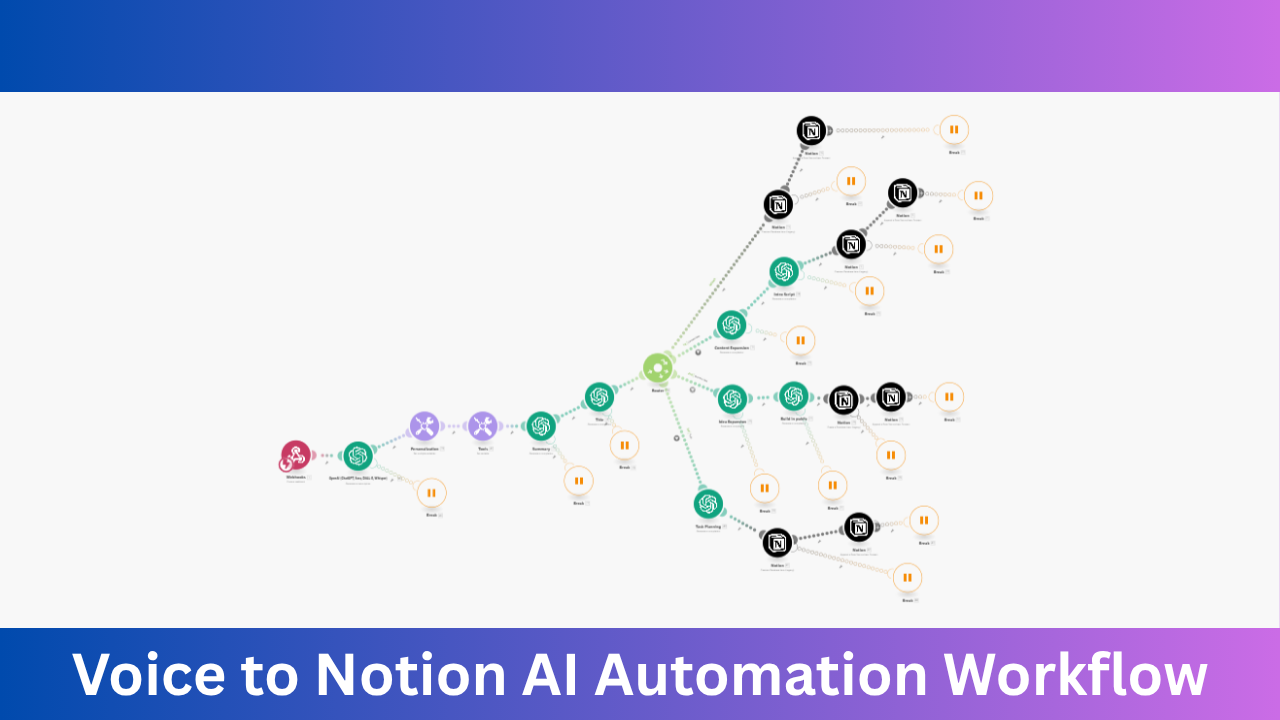
- Automation Blueprint: A detailed Make.com scenario for linking voice capture, AI text processing, and Notion syncing. Plug-and-play for almost instant deployment.
- Step-by-Step Documentation: Full guides to help you install, adapt, and scale the workflows to your unique business needs.
This system is supported on leading automation platforms like Make.com (formerly Integromat), and can be adapted for tools like n8n or Zapier for maximum flexibility. Enterprise-grade, yet simple enough for solo professionals—no previous workflow automation experience is required.
Looking for platform-specific automations and integration ideas? Explore our extensive library of Make.com automation workflows and n8n templates.
Key Benefits, ROI & Cost Savings
- Save Hours Every Week: Reduce manual note-taking, transcription, and idea sorting to seconds. An average user saves 2–6 hours weekly just on ideation capture and task sorting.
- Capture Every Opportunity: Never lose an idea because you’re driving, at the gym, or away from your desk. One-tap voice capture works everywhere.
- Immediate ROI: For just $5, you’ll gain back dozens of hours per month—turning lost potential into actionable projects, faster content creation, and more business wins.
- Zero Learning Curve: Prebuilt blueprints mean instant productivity—skip the months needed to custom code an AI workflow or manually integrate tools.
| Cost/Time Comparison | Manual Process | With Automation System |
|---|---|---|
| Idea Capture & Sorting | 15–30 min/idea | 1–2 min/idea |
| AI-Powered Summaries | Not feasible | Automatic, instant |
| Setup & Training | Custom code, dev time | Plug & Play, Minutes |
| Monthly Cost | $0 (DIY) + time, or $500+ (developer) | $5 one-time |
Business Problems Solved & What You Can Automate
Modern professionals and organizations face a flood of inspiration—yet slow, fragmented processes keep insights from turning into results. This AI Voice Automation System solves these universal bottlenecks:
- Problem: Missed Ideas & Delayed Notes
Solution: Capture thoughts instantly through voice, wherever you are. - Problem: Information Overload
Solution: AI sorts and prioritizes notes, automatically categorizing for fast retrieval. - Problem: Manual Transcription and Data Entry
Solution: Automate transcription and seamlessly sync with your Notion workspace—no human intervention required. - Problem: Brainstorming to Action Disconnect
Solution: Convert brainstorms into actionable plans or content outlines in seconds, not hours.
Common automations include:
- Voice-recorded content and idea capture
- AI summarization and categorization
- Task and project queueing
- Journaling and daily logging
- Social media post and content creation drafts
Categories of Automations Included
- Voice Capture & AI Processing: Instantly record thoughts, meetings, and tasks to Notion, powered by GPT-based analysis.
- Content & Social Automation: Turn ideas into social posts, blogs, video scripts, or tweets in a single click.
- Task & Project Tracking: Log todos or brainstorms, auto-tagged and sorted for action in Notion.
- CRM & Lead Workflows: Capture follow-ups, client notes, or new opportunities—streamlined into your Notion-based client tracker.
- Daily Journaling & Time Management: Maintain daily logs or time stamps using just your voice—organized, time-stamped, and ready for review.
Want to automate more? Check out our collection of premium automation bundles for advanced business systems.
Highlighted Features of this AI Voice Automation System
What makes the Voice to Notion AI Automation System stand out in the crowded world of productivity tools?
- 1-Click Plug and Play Setup: Import blueprints and Notion templates with zero friction—get up and running in under 15 minutes.
- Genuine AI Integration: Harness OpenAI models for advanced text interpretation, summaries, tagging, and even next-step suggestions. No manual copy-paste or third-party app juggling.
- Multi-Platform Compatibility: Works out of the box with Make.com, and can be adapted for n8n and Zapier—whatever fits your stack best.
- Ready-to-Use Notion Workspaces: Import structured tables and boards for Ideas, Tasks, Journals, Brainstorms, and more. Instant organization, fully customizable.
- Comprehensive Documentation: Step-by-step guides, troubleshooting, and support contacts so every user can succeed—no tech expertise needed.
- Lifetime Updates: Get ongoing improvements, new workflows, and AI prompt tweaks at no extra cost.
Example Automations
- Idea Capture while Driving: Tap your Shortcuts button, dictate your insight—your voice is auto-transcribed, categorized, and sent to Notion as a new idea entry.
- Content Brainstorm to Outline: Record a rough content topic; AI transforms your note into a structured blog outline or bullet list, tagged for review.
- Journaling in Seconds: Dictate your day’s reflections; an AI-written summary is added to your daily Notion journal for reflective tracking.
- Instant To-dos from Voice: Speak new tasks or follow-ups; they’re parsed by AI, prioritized, and added to your task dashboard—no typing required.
- Client Call Recaps: Record client meeting notes on the go; the system summarizes action items and logs everything in the appropriate Notion project.
- Quick Social Media Drafts: Capture a social content idea by voice; AI drafts a post for your preferred network in your Content pipeline.
Ready to explore more automation workflows? Browse our library of AI voice agents for even more creative and operational solutions.
Who Should Use This Pack?
This automation toolkit delivers value for anyone who needs to capture, organize, and act on ideas at lightning speed, including:
- Content Creators & Marketers: Instantly move inspiration to working copy—speed up brainstorming, campaign planning, and publishing.
- Startup Teams & Solopreneurs: Convert every fleeting thought into business plans, features, or client engagement tasks.
- Agencies & Consultants: Keep meeting notes, client feedback, and strategy ideas flowing smoothly into project pipelines.
- Busy Freelancers: No more searching through phone notes or emails—everything auto-sorted and actionable in Notion.
- Anyone Focusing on Personal Knowledge Management: Build your “second brain” as efficiently as top productivity pros, with no manual overhead.
If you’re searching for a solution that bridges creativity and execution, the Voice AI Automation System is your unfair advantage.
Why Voice to Notion AI Automation Is the Best Choice
Compared to the alternatives—manual syncing, hiring developers, or stitching together free apps—this template pack is unmatched:
- Manual Workflow: Heavy time sink, prone to errors, easily forgotten or misplaced notes.
- Custom Coding: Weeks of scripting, troubleshooting, and ongoing maintenance—time and cost intensive.
- Hiring Developers: Costs hundreds (even thousands) for custom automations, plus training and updates.
- This System: Plug-and-play, $5, always up to date, and customizable for your stack.
Curious about other automation bundles? Explore our range of premium automation solutions to scale business processes even further.
Setup & Onboarding
One of the biggest advantages of the Voice to Notion AI Automation System – Template Pack (v2) is its incredibly streamlined setup. Here’s how easy it is:
- Import: Download your Make.com scenario and Notion workspace template.
- Connect: Link your Notion and OpenAI (for ChatGPT) accounts using easy prompts.
- Customize: Adjust AI prompts, tags, or workflow triggers if needed (optional—works out of the box).
- Run: Launch your Shortcut on iPhone or Mac; start capturing ideas immediately. Watch them arrive, organized, in your Notion dashboard.
Support and onboarding documentation are included, so you can go from purchase to productivity in under 15 minutes.
Manual vs Automated Comparison
| Step | Manual Process | Automated with Voice-to-Notion |
|---|---|---|
| Capture Idea | Open Notion app, type idea | Speak idea, tap Shortcut |
| Transcribe & Categorize | Type, sort, tag manually | AI transcribes, categorizes, tags |
| Create Action Steps | Write out steps one by one | AI suggests actions, auto-adds |
| Log & Organize | Manually sort in Notion | Entry routed & saved automatically |
Case Study
Ella, a solo podcast host and online writer, often brainstormed episode ideas while commuting or walking her dog. She used to record thoughts as voice memos, then spent hours on weekends transcribing, sorting, and turning them into scripts.
After deploying the Voice to Notion AI Automation System, Ella now taps her phone, records ideas, and within minutes receives a structured podcast outline—summarized, tagged, and ready in Notion. She saves 4+ hours per week, publishes more consistently, and never misses a moment of inspiration. For her, this $5 system outperformed paid note-taking apps and expensive custom workflows.
Security & Reliability
Security and trust matter. This system runs on Make.com and Notion, platforms trusted by thousands of businesses worldwide, with encrypted connections and strict data privacy. All API and authentication tokens are managed securely on your own account—no data is ever shared with third parties. Automation scenarios are tested for stability, and documentation includes troubleshooting and safe setup tips. You retain full control of your workflow and sensitive information.
Bonus Value
- Lifetime Access: All future updates, improvements, and new automation templates included.
- Commercial Rights: Use in your own agency or consulting offers—save time for clients and add revenue streams.
- Dedicated Support: Hands-on guidance from the workflow creator to ensure your success.
Updates & Roadmap
We’re actively building and improving! New features on the roadmap include:
- Multi-user/Team collaboration automations
- Deeper AI summarization and custom prompt expansion
- Voice tone analysis and content style detection
- Broader platform support—direct n8n scenario exports and enhanced mobile workflows
All updates are included with your purchase—your toolkit keeps getting smarter over time!
Guarantee
Your satisfaction is 100% guaranteed. If this AI Voice Automation System doesn’t save you hours or transform your workflow, contact us within 14 days for a full refund—no questions asked.
FAQs
- Do I need technical skills to set this up?
No! The template pack includes step-by-step guides. If you can use Notion and follow simple instructions, you can launch this workflow in minutes. - Does it work with Android or only iPhone?
The one-tap voice shortcut is optimized for iPhone and Mac, but the underlying workflow is platform-independent—you can adapt it for Android voice apps or even web-based audio tools. - Is OpenAI/ChatGPT use included?
You will need your own OpenAI API key for AI-powered processing. Most users stay well within the free or low-cost tier for idea capture and summaries. - Can I customize the Notion templates?
Yes! All Notion workspaces are fully customizable—add fields, tags, or new views to fit your exact workflow. - What support is available if I get stuck?
Email support, direct messaging with the creator, and documentation are all included. Need help with Make.com or Notion? We’re here to guide you. - Can I expand the workflow for more automations?
Absolutely. Use the provided scenario as a launchpad—add other Make.com or n8n modules for integrations with CRM, email, social media, and more. See more expansion ideas in our collections of free automation templates.
Conclusion
Inspiration moves fast—the difference between an average and exceptional business, creator, or team is how quickly ideas move into action. The Voice to Notion AI Automation System bridges that gap by turning your voice into organized, actionable notes in Notion, powered by intelligence that never sleeps. Whether you’re aiming to scale your output, streamline your knowledge management, or simply stop losing great ideas, this toolkit is the competitive edge you’ve been looking for. For just $5, unlock a workflow trusted by forward-thinking professionals and agencies worldwide—your second brain, automated.
Don’t let great ideas slip away. Automate, organize, and act—starting today. Ready to upgrade your workflow? Get started with automation workflows now.